
SolaDrive: Your Go-To for Fully Managed Windows Hosting Solutions for Business Systems
SolaDrive specializes in providing fully managed Windows hosting solutions tailored for businesses that depend on stable systems. Many organizations rely on Windows…

No Fix Available Yet for New PhantomRPC Privilege Escalation Vulnerability in Windows
A newly discovered vulnerability in the Windows Remote Procedure Call (RPC) system—termed "PhantomRPC"—opens the door for attackers to escalate their privileges to…
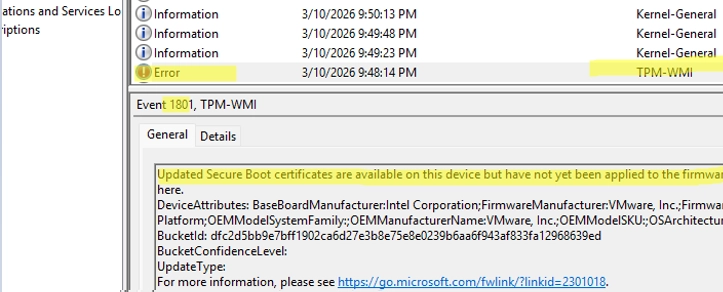
A Comprehensive Guide to Updating UEFI Secure Boot Certificates on Windows Devices
Updating UEFI Secure Boot Certificates on Windows Devices Secure Boot is a UEFI security feature designed to prevent the loading of unsigned…

Critical High-Risk Vulnerabilities Addressed in Microsoft’s April Security Update
On April 15, Microsoft released its April Security Update, addressing a total of 165 security vulnerabilities affecting various products including Windows, Microsoft…

Microsoft Faces £1.7 Billion Lawsuit for Alleged Abuse of Power in Cloud Computing Market
Microsoft is facing a significant legal challenge related to its cloud services, as over 59,000 businesses in the UK have united to…

Microsoft Faces $2.8 Billion Lawsuit Over Cloud Licensing Practices Affecting 60,000 Businesses
Microsoft is facing a significant $2.8 billion class-action lawsuit over alleged anti-competitive pricing practices related to its Windows Server software. A London…

Strategic Planning for Windows Server 2025: Key Priorities for Organizations in 2026
In 2026, organizations are exploring pathways to Windows Server 2025 as demands for heightened operational efficiency and security continue to rise. With…
Microsoft Responds with Emergency Fixes Following Windows Server Outages
Microsoft has released emergency software updates to address issues affecting some Windows Server systems following its latest monthly security patches. These problems…
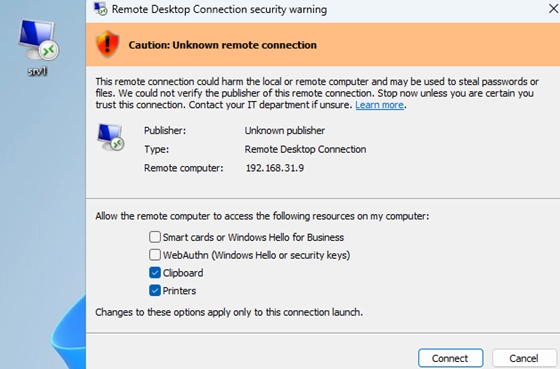
Navigating Security Warnings: A Guide to Opening RDP Files in Windows 11
The recent security updates for Windows 11 and Windows 10 have altered the way Remote Desktop Protocol (RDP) files are handled. Following…
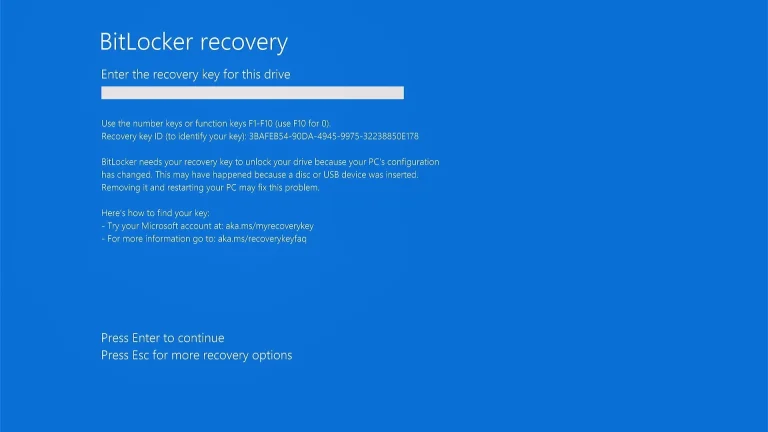
Microsoft Acknowledges Windows 11 KB5083769 Issues: BitLocker Alerts and Installation Reboot Loops
Windows 11 KB5083769 is currently causing issues for some users, notably triggering BitLocker recovery screens on certain PCs. Microsoft has acknowledged the…