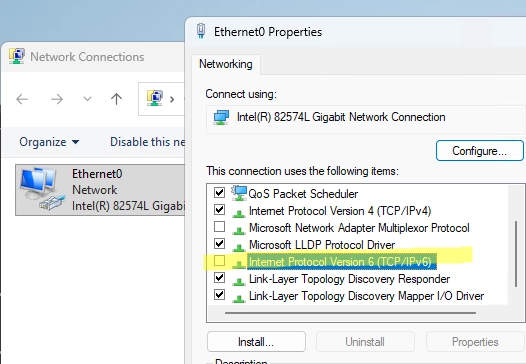
Although the IPv6 protocol is enabled by default in all Windows versions, it is not commonly used in home and small office networks. As a result, many sources recommend disabling IPv6 to resolve network issues. However, Microsoft advises against completely disabling IPv6 unless absolutely necessary, especially on Windows Server, where various components rely on link-local IPv6 addresses for internal operations.
How to Make Windows Prefer IPv4 Over IPv6
Instead of turning off IPv6, you can prioritize IPv4. In cases where both IPv6 and IPv4 addresses are available, Windows typically tries to use the IPv6 address first. If this connection fails, delays or errors might occur, particularly for older applications. To adjust the protocol priority, follow this command:
reg add HKLMsystemcurrentcontrolsetservicestcpip6parameters /v DisabledComponents /t REG_DWORD /d 0x20The values for the DisabledComponents registry parameter are as follows:
0: IPv6 is enabled (default)0x10: Disable IPv6 on all non-tunnel interfaces0x01: Disable IPv6 on all tunnel interfaces0x11: Disable IPv6 (except loopback)0x20: Prefer IPv4 over IPv6 (recommendable)0xFF: Disable IPv6 completely (not recommended)
You can also modify the IPv4 preference with the following commands:
netsh interface ipv6 set prefix ::/96 60 3netsh interface ipv6 set prefix ::ffff:0:0/96 55 4How to Properly Disable IPv6 on Windows
If prioritizing IPv4 doesn’t resolve the issues, you may consider disabling IPv6 altogether. However, it’s crucial to do it correctly, as unchecking the Internet Protocol Version 6 (TCP/IPv6) option in network adapter properties only disables IPv6 for that adapter, not system-wide.
To completely disable IPv6, you should change the DisabledComponents parameter value to 0xFF using:
reg add HKLMsystemcurrentcontrolsetservicestcpip6parameters /v DisabledComponents /t REG_DWORD /d 0xFFAfter implementing this change, make sure to restart your computer.
For managing this setting across multiple computers in an Active Directory environment, you can deploy the DisabledComponents registry item via Group Policy.
Verifying IPv6 is Disabled
To check if IPv6 has been completely disabled, you can execute:
netsh interface ipv6 show interfacesIf IPv6 is disabled, the result will be empty. Alternatively, you can ping the loopback interface. If IPv6 is operational, it will return its IPv6 address (::1); if not, it should reflect the IPv4 address (127.0.0.1).
If desired, to re-enable IPv6, simply set the DisabledComponents parameter value back to 0 or remove it entirely:
reg delete "HKLMSYSTEMCurrentControlSetServicesTcpip6Parameters" /v DisabledComponents /f