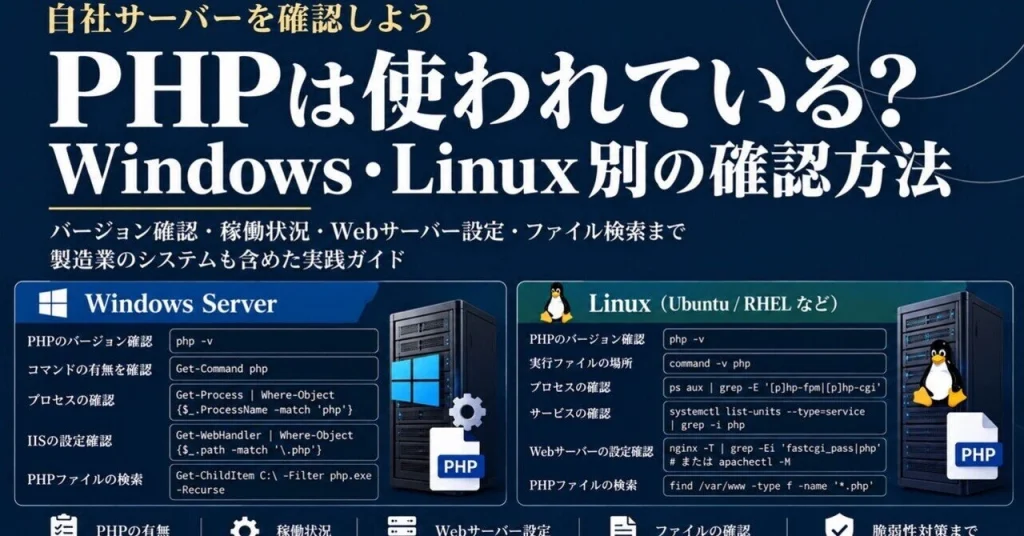
When a PHP vulnerability is reported, organizations need to know whether their servers and business systems are affected. That can be difficult in manufacturing environments, where the software behind production, quality-control, equipment-maintenance, and supplier systems may not be well documented.
Checking PHP requires more than looking at its version. Confirm whether PHP is installed, whether a PHP process or service is running, and whether the web server actually routes requests to PHP. A php -v result alone does not establish whether a website uses PHP; PHP may also be installed in a custom location or running inside a container.
Checking Linux servers
Use several checks to build a fuller picture:
php -vcommand -v phpls -l /usr/bin/php* /usr/local/bin/php* 2>/dev/nullps aux | grep -E '[p]hp-fpm|[p]hp-cgi'systemctl list-units --type=service --all | grep -i phpThe version command usually reports the CLI version, which may differ from the version used by PHP-FPM. The process and service checks can reveal running components, while package managers can help identify managed installations:
# Ubuntu and Debiandpkg -l | grep -Ei 'php|libapache2-mod-php'# RHEL and Rocky Linuxrpm -qa | grep -Ei '^php|php-fpm'These package checks will not find PHP installed outside the package manager. PHP can also run through an Apache module rather than PHP-FPM or PHP-CGI.
Check web-server configuration as well. For Nginx:
sudo nginx -T 2>/dev/null | grep -Ei 'fastcgi_pass|php'For Apache:
apachectl -M 2>/dev/null | grep -Ei 'php|proxy_fcgi'A PHP module or FastCGI configuration is useful evidence, but it does not always prove that PHP is actively used by a particular site. Nginx configuration output can contain sensitive information, so do not expose it externally.
You can also search likely web directories for PHP files:
sudo find /var/www -type f -iname '*.php' -printFinding files does not necessarily mean they are being accessed, and the public directory may be somewhere else.
Checking Windows Server
On Windows Server, PowerShell can help locate PHP and identify related processes:
Get-Command php -ErrorAction SilentlyContinuephp -vGet-Process | Where-Object { $_.ProcessName -match 'php' }Get-ChildItem C:PHP -Filter php.exe -Recurse -ErrorAction SilentlyContinuePHP may not be registered in PATH, and a process started only when a request arrives might not appear during the investigation. C:PHP is only an example location; searching entire drives recursively can consume significant resources, so limit the search when possible.
For IIS, inspect handler mappings:
Import-Module WebAdministrationGet-WebHandler | Where-Object { $_.scriptProcessor -match 'php|php-cgi' -or $_.path -match '.php'}If PHP-related mappings appear, check which sites or applications use them. This command requires the relevant IIS features and management module to be installed.
Check containers and vendor-managed systems
PHP may be absent from the host operating system but present in a Docker container. List running and stopped containers:
docker psdocker ps -aOnce you identify a relevant container, check its PHP version:
docker exec <container-name> php -vThe php command may not be available inside the container. In that case, review the image configuration, software bill of materials (SBOM), or vendor documentation. Kubernetes and other execution platforms require checks suited to their management tools.
In manufacturing, equipment monitoring, inspection, and maintenance systems may contain software that the organization does not manage directly. Ask the equipment or system provider whether PHP is used, whether the deployed version is affected, when a fix will be available, and whether an update could affect equipment operation. Do not update software bundled with equipment without the provider’s guidance, as changes may affect operation or warranty conditions.
Investigating a vulnerability
If PHP is present, record the version, installation method, provider, business system involved, external accessibility, maintenance owner, and patch status. Do not determine vulnerability status from the version number alone: operating-system vendors may backport fixes without changing the displayed version. Check security advisories from both the PHP project and the relevant operating-system or product vendor. See PHP’s supported versions.
Prioritize systems accessible from the internet, systems that handle confidential information, and systems whose disruption could stop production. Before applying updates, plan appropriate backups, compatibility checks, change approvals, and post-update log reviews.
Keep the results in an IT/OT asset inventory. For each system, record its name, operating system, PHP status and version, date checked, external access, responsible team, maintenance provider, and remediation status. Knowing what is running, where it is running, and who maintains it makes the next vulnerability response faster and more reliable.
Check production systems only with the required administrator approval, and follow internal policies for information handling and operational changes.